GE Front-Load Washer Service Mode, Tests and Fault Codes
We typed this up from the tech sheet (pub 31-3000269, Rev 1, GEA 11-21) that came with a GE front-load washer, model GFW550SSN2WW, during a leak call in Trinity. Other GE front-load washers on the same platform use a similar sheet, but test numbers and codes can vary by model, so check the one that came with yours. Ours was folded up inside the washer's top.
This is service technician information. Several tests run valves, the pump, the motor and the heater, and some checks are done with power on. If you're not comfortable with that, call a technician.
The photo of the sheet that we have starts after the steps for entering field service mode, so this page covers what you do once the washer is in service mode, plus consumer fault code mode, which you can use without opening the washer.
Reading fault codes without service mode
This is consumer fault code mode. On this GE washer it works from the control panel, with no tools.
- Start with the washer idle, with all LEDs off.
- Press and hold the Start pad for 10 seconds. All the LEDs turn on to tell you to let go.
- The Pause and Door Lock LEDs blink steadily while you're in this mode.
- If the washer has a fault, the first one shows on the seven segment display.
- Press Start to show the next fault. The code blinks on the display.
- At the end of the list, or if there are no faults, the display blinks a dash.
To exit, press any pad other than Start or turn the knob. The mode times out after 10 minutes. The codes are explained in the fault code table below.
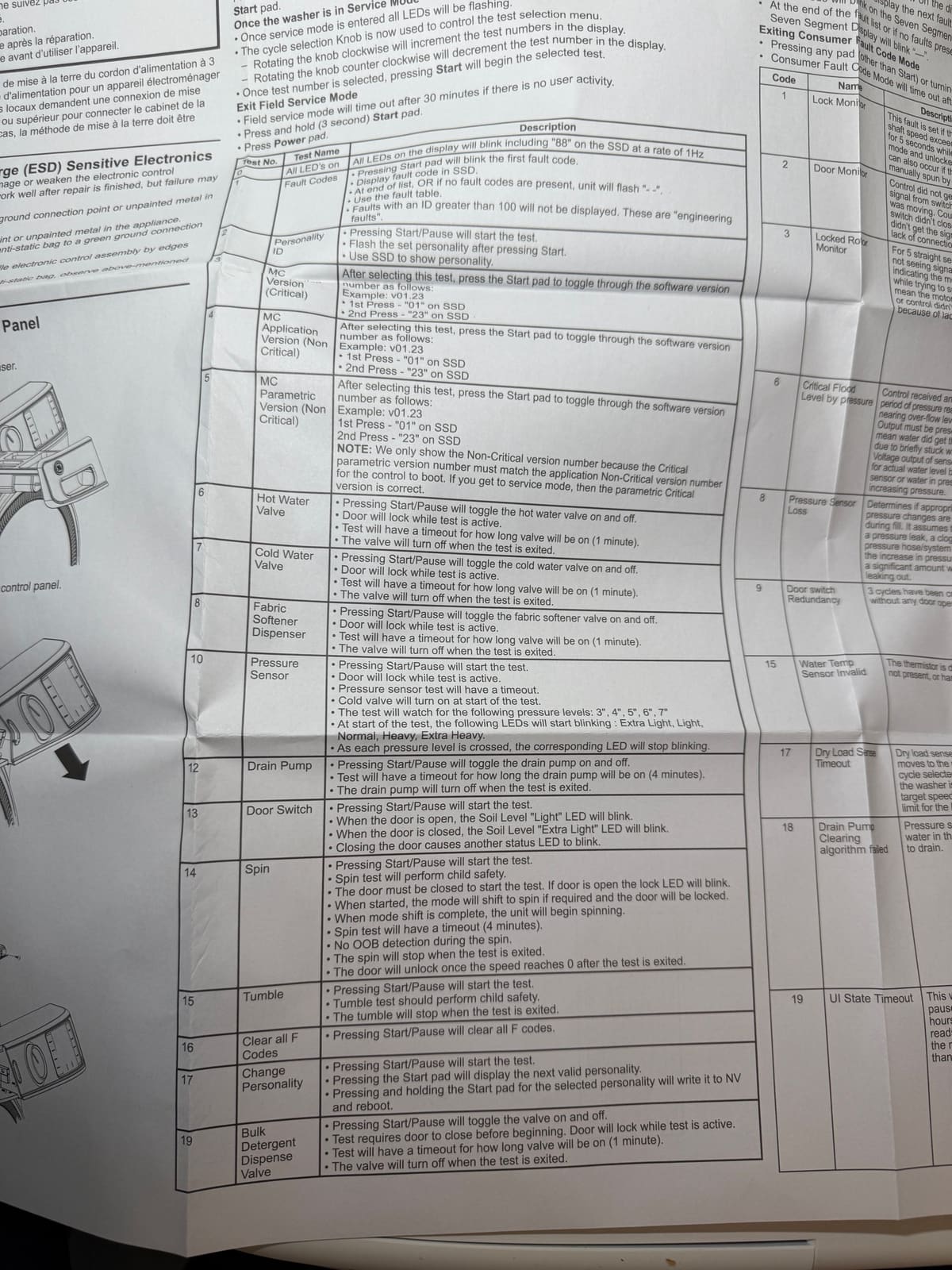
Using service mode once you're in it
- When service mode starts, all LEDs flash.
- The cycle selector knob picks the test. Turn it clockwise to go up a test number and counterclockwise to go down.
- Press Start to begin the selected test.
- To exit, press and hold Start for 3 seconds, or press Power. With no activity, service mode times out after 30 minutes.
- The sheet's test list skips numbers 9, 11 and 18.
Service mode tests
| Test | Name | What it does |
|---|---|---|
| 0 | All LEDs on | All LEDs on the display blink, including 88 on the seven segment display (SSD), at 1 Hz. |
| 1 | Fault codes | Press Start to blink the first fault code on the SSD. Press Start again for the next one. At the end of the list, or if there are no faults, the unit flashes - -. Faults with an ID above 100 aren't displayed. Those are engineering faults. |
| 2 | Personality ID | Press Start/Pause to start. The set personality flashes on the SSD. |
| 3 | MC version (critical) | Press Start to step through the software version. Example v01.23: first press shows 01, second press shows 23. |
| 4 | MC application version (non critical) | Same as test 3. Press Start to step through the version number. |
| 5 | MC parametric version (non critical) | Same as test 3. Only the non-critical version shows, because the critical parametric version has to match for the control to boot at all. If you got into service mode, the critical version is correct. |
| 6 | Hot water valve | Start/Pause toggles the hot water valve on and off. Door locks during the test. Times out after 1 minute. The valve turns off when you exit. |
| 7 | Cold water valve | Start/Pause toggles the cold water valve. Door locks, 1 minute timeout, valve turns off on exit. |
| 8 | Fabric softener dispenser | Start/Pause toggles the fabric softener valve. Door locks, 1 minute timeout, valve turns off on exit. |
| 10 | Pressure sensor | Start/Pause starts the test. Door locks. The cold valve turns on and the test watches for pressure levels of 3, 4, 5, 6 and 7 inches. At the start the LEDs Extra Light, Light, Normal, Heavy and Extra Heavy blink. As each pressure level is crossed, its LED stops blinking. Has a timeout. |
| 12 | Drain pump | Start/Pause toggles the drain pump. 4 minute timeout. The pump turns off when you exit. |
| 13 | Door switch | Start/Pause starts the test. Door open: the Soil Level Light LED blinks. Door closed: the Soil Level Extra Light LED blinks. Closing the door also makes another status LED blink. |
| 14 | Spin | Start/Pause starts the test, with child safety. The door must be closed, or the lock LED blinks. When started, the mode shifts to spin if needed and the door locks. Then the drum spins. 4 minute timeout, no out of balance detection during the spin. The spin stops when you exit, and the door unlocks once the speed reaches 0. |
| 15 | Tumble | Start/Pause starts the test, with child safety. The drum tumbles until you exit. |
| 16 | Clear all F codes | Start/Pause clears all F codes. |
| 17 | Change personality | Start/Pause starts the test. Pressing Start shows the next valid personality. Pressing and holding Start for the selected personality writes it to memory and reboots the washer. |
| 19 | Bulk detergent dispense valve | Start/Pause toggles the valve. The door must be closed before the test begins and it locks during the test. 1 minute timeout, valve turns off on exit. |
| 20 | Heater and thermistor | Start/Pause starts the test, with child safety. The door must be closed and locked, or the lock LED blinks. A steam fill routine runs first. Then the heater turns on, with a 5 minute timeout, and the SSD shows the thermistor temperature. |
| 21 | Prewash valve | Start/Pause toggles the valve. Door must be closed, locks during the test. 1 minute timeout. |
| 22 | Steam valve | Start/Pause toggles the valve. Door locks, 1 minute timeout. |
| 23 | Bleach valve | Start/Pause toggles the valve. Door locks, 1 minute timeout. |
| 24 | Damper | Start/Pause toggles the damper. If the damper feedback says it's open, the Soil Level Light LED blinks. If it says closed, the Extra Light LED blinks. |
| 25 | Overnight ready fan / ONR fan | Start/Pause toggles the fan. Fan on: Soil Level Light LED blinks. Fan off: Extra Light LED blinks. Not all models have the fan (the sheet says only 850 models do). |
| 26 | Accelerated spin test | Start/Pause starts the test, with child safety. The door must be closed to start the ramp up, and the damper too. The mode shifts to spin if needed and the door locks. Times out after about 2 minutes. No out of balance detection. The damper opens and the door unlocks once the speed reaches 0 after you exit. The SSD only has 3 digits, so multiply the number by 10: 110 on the display means 1100 RPM. |
Fault codes
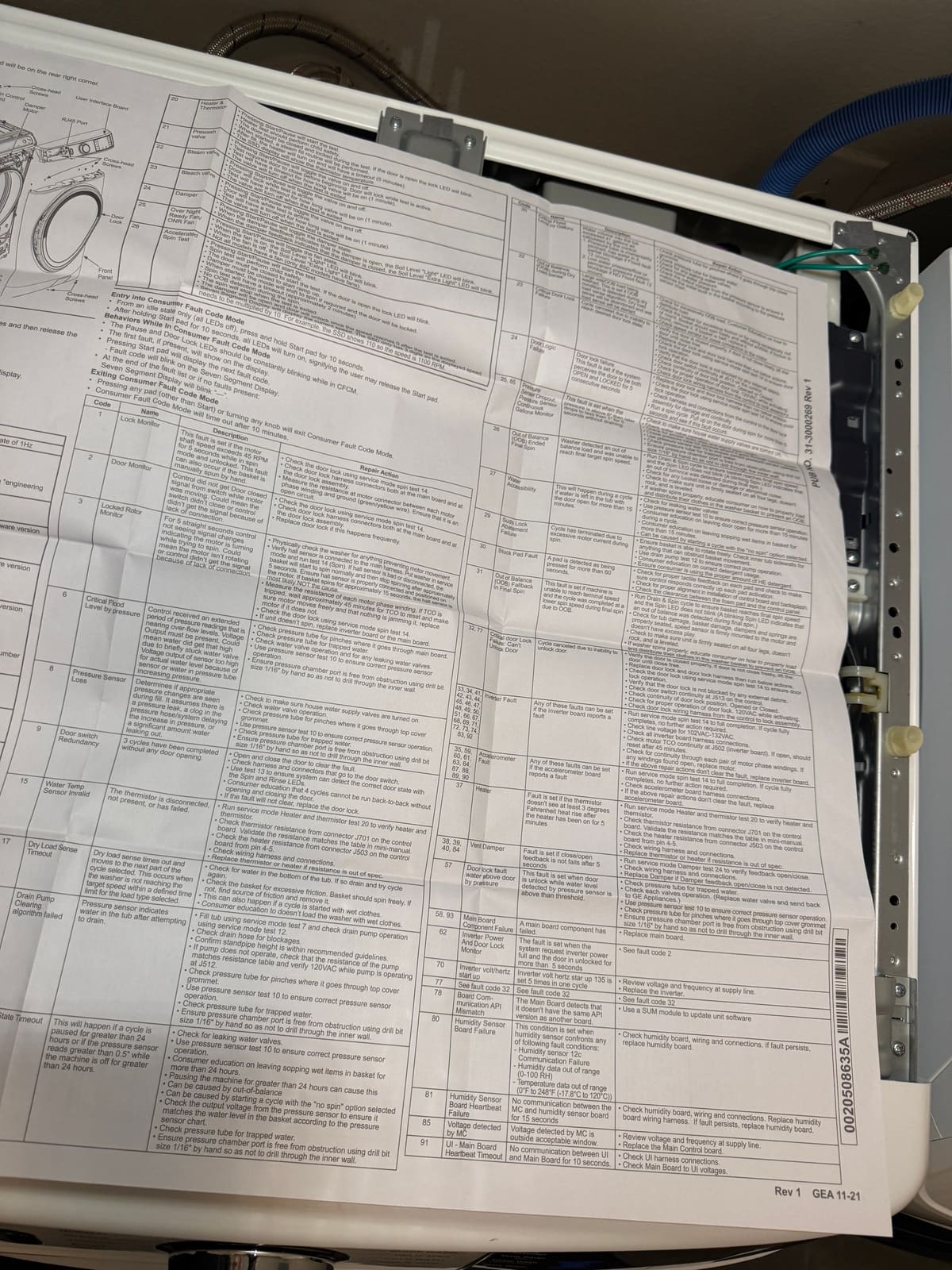
This is our summary of the sheet's fault code table: what each fault means and what the sheet tells the technician to check. The numbers for some tests point back to the test table above.
| Code | Name | What it means | What to check |
|---|---|---|---|
| 1 | Lock monitor | Motor shaft speed went over 45 RPM for 5 seconds in spin mode while the door was unlocked. Can also happen if someone spins the basket by hand. | Check the door lock with spin test 14. Check the door lock harness at the main board and at the lock. Measure resistance from each motor phase winding to ground (green/yellow wire). It should be an open circuit. |
| 2 | Door monitor | The control didn't get a door closed signal from the switch while the motor was moving. The switch didn't close, or the signal didn't get through. | Check the door lock with spin test 14. Check the harness connectors at the main board and the lock. Replace the door lock if it keeps happening. |
| 3 | Locked rotor monitor | For 5 straight seconds the control saw no signal changes from the motor while trying to spin. The motor isn't turning, or the signal didn't get to the control. | Look for anything physically stopping the motor. Check that the hall sensor is connected to the main harness, then run spin test 14. A bad or disconnected hall sensor lets the basket start normally, then stop after about 5 seconds. If the basket spins for about 15 seconds, the hall sensor is probably not the cause. Measure each motor phase winding. If the TCO tripped, wait about 45 minutes for it to reset. If the unit still won't spin, replace the inverter board or the main board. |
| 6 | Critical flood level by pressure | The control saw pressure readings near overflow for an extended time. Either water really got that high because a valve stuck, or the sensor output is too high because of the sensor or water in the pressure tube. | Check the pressure tube for pinches and trapped water. Check the water valves for operation and leaks. Use pressure sensor test 10. Make sure the pressure chamber port is clear, using a 1/16 inch drill bit by hand without drilling through the inner wall. |
| 8 | Pressure sensor loss | The control didn't see the pressure changes it expects during fill. That could be a pressure leak, a clog in the pressure hose, or a lot of water leaking out. | Check that the house supply valves are on. Check valve operation. Check the pressure tube for pinches at the top cover grommet and for trapped water. Run pressure sensor test 10. Clear the pressure chamber port. |
| 9 | Door switch redundancy | 3 cycles have run without the door being opened. | Open and close the door. Check the harness at the door switch. Use test 13 to confirm the door state shows on the Spin and Rinse LEDs. 4 cycles can't be run back to back without opening and closing the door. If it won't clear, replace the door lock. |
| 15 | Water temp sensor invalid | The thermistor is disconnected, not there, or has failed. | Run heater and thermistor test 20. Check thermistor resistance at connector J701 on the control board against the table in the mini-manual. Check heater resistance at J503, pins 4 and 5. Check the wiring. Replace the thermistor or heater if the resistance is out of spec. |
| 17 | Dry load sense timeout | Dry load sensing timed out and the cycle moved on, because the washer didn't reach its target speed in the allowed time. | Check for water in the bottom of the tub and drain it. Check the basket for friction. It should spin freely. Can also happen if a cycle starts with wet clothes. |
| 18 | Drain pump clearing algorithm failed | The pressure sensor shows water in the tub after the washer tried to drain. | Fill the tub with test 7 and check the pump with test 12. Check the drain hose for blockages and the standpipe height. If the pump doesn't run, compare its resistance to the table and check for 120 VAC at J512 while it should be running. Check the pressure tube for pinches and trapped water. Run test 10. Clear the pressure chamber port. |
| 19 | UI state timeout | A cycle was paused for more than 24 hours, or the pressure sensor read over 0.5 inch while the washer was off for more than 24 hours. | Check for leaking water valves. Run test 10. Wet items left sitting in the basket, pausing a cycle for a day, an out of balance load, or a cycle started with no spin selected can cause it. Check the sensor's output voltage against the pressure chart, check the tube for trapped water, and clear the port. |
| 20 | Critical flood level by gallons | The calculated water volume into the tub went over 41 gallons. | Check the pressure tube for pinches and trapped water. Check for leaking water valves. Check the home water pressure. Check the sensor's output voltage against the pressure chart. |
| 22 | Out of balance during dry load sense | A large wet or out of balance load was detected during dry load sensing. Dry load sensing is abandoned and wet load sensing starts. | Check for an out of balance load and show the customer how to distribute it. Check the basket for friction or being out of round. It should spin freely without wobbling. Replace the basket if it's bad. Check the speed sensor connection to the motor. |
| 23 | Critical door lock failure | The cycle was canceled because the door lock couldn't reach the state the control wanted. | Verify the door closes properly. Check the door lock with spin test 14. Make sure nothing outside is blocking the lock. Check door switch continuity at J513 on the control, the lock position, and 120 VAC at the lock while it activates. Check the harness from the control to the lock. Replace the lock and harness if needed. |
| 24 | Door logic failure | Set if the system sees the door as both open and locked for 5 seconds in a row. | Check the door lock with spin test 14. Check the door lock harness and connections for damage and continuity. Run a spin cycle and pull up on the door for more than 5 seconds during the spin to see if the fault appears. |
| 25, 65 | Pressure sensor dropout / continuous gallons monitor | The pressure went above 6 inches, then dropped to less than 1 inch within 5 seconds without draining. | Check that the house supply valves are on. Check valve operation. Check the pressure tube for pinches and trapped water. Run test 10. Clear the pressure chamber port. |
| 26 | Out of balance ended final spin | The washer detected an out of balance load and couldn't reach its final target spin speed. | Run a Drain & Spin cycle. A blinking Spin LED means out of balance was detected during final spin. Check for tub damage, basket damage, dampers and springs seated properly, and the speed sensor mounted firmly on the motor with no excess play. Make sure the washer sits firmly on all four legs, doesn't rock and is level. If it spins properly, show the customer how to load and distribute clothes. |
| 27 | Water accessibility | Water was left in the tub with the door open for more than 15 minutes during a cycle. | Check for leaking water valves. Run test 10. Wet items left in the basket for more than 15 minutes or leaving the door open mid-cycle can cause it, as can starting a cycle with no spin. |
| 29 | Suds lock abatement failure | The cycle ended because of excessive motor current during spin. | Make sure the basket spins freely and nothing blocks it. Check the drain pump with test 12. Ask the customer about detergent use and make sure they're using the right amount of HE detergent. |
| 30 | Stuck pad fault | A pad was detected as pressed for more than 60 seconds. | Check for proper tactile feedback on each pad and that the control responds to each one. Check the control board and backsplash are aligned. Check the clearance between the foam pad and the control panel. |
| 31 | Out of balance fallback in final spin | The machine couldn't reach terminal speed and finished the cycle at a lower spin speed because of out of balance. | Same checks as code 26. |
| 32, 77 | Critical door lock failure: can't unlock door | The cycle was canceled because the door couldn't be unlocked. | Verify the door closes properly and lift it until it closes freely if it doesn't. Check the lock with spin test 14. Check for debris blocking the lock, door switch continuity at J513, 120 VAC at the lock, and the harness from the control. Replace the lock and harness if needed. |
| 33, 34, 41 to 51, 66 to 69, 71 to 74, 83, 92 | Inverter fault | Any of these can be set when the inverter board reports a fault. | Run spin test 14 to full completion. If it completes, no action needed. Check line voltage (102 to 132 VAC) and the inverter board harness connections. Check motor TCO continuity at J502. If open, it should reset after 45 minutes. Check continuity through each pair of motor phase windings and replace the motor if any are open. If nothing clears it, replace the inverter board. |
| 35, 59, 60, 61, 63, 64, 87 to 90 | Accelerometer fault | Any of these can be set when the accelerometer board reports a fault. | Run spin test 14 to full completion. If it completes, no action needed. Check the accelerometer board harness connections. If it doesn't clear, replace the accelerometer board. |
| 37 | Heater | The thermistor didn't see at least a 3 degree F rise after the heater was on for 5 minutes. | Run heater and thermistor test 20. Check thermistor resistance at J701 against the mini-manual table and heater resistance at J503, pins 4 and 5. Check the wiring. Replace the thermistor or heater if out of spec. |
| 38, 39, 40, 84 | Vent damper | Damper open or close feedback wasn't seen after 5 seconds. | Run damper test 24 to check the feedback. Check the wiring and connections. Replace the damper if open or close feedback isn't detected. |
| 57 | Door lock fault, water above door by pressure | The door was unlocked while the pressure sensor detected water above the threshold. | Check the pressure tube for trapped water and pinches. Check each water valve for operation (the sheet says to replace the water valve and send it back to GE Appliances). Run test 10. Clear the pressure chamber port. |
| 58, 93 | Main board component failure | A main board component has failed. | Replace the main board. |
| 62 | Inverter power and door lock monitor | The system requested full inverter power while the door was unlocked for more than 5 seconds. | See fault code 2. |
| 70 | Inverter volt/hertz start up | Inverter volt/hertz start up 135 was set 5 times in one cycle. | Review voltage and frequency at the supply line. Replace the inverter. |
| 78 | Board communication API mismatch | The main board detects that it doesn't have the same API version as another board. | Use a SUM module to update the unit software. |
| 80 | Humidity sensor board failure | The humidity sensor board has a communication failure, humidity data out of range (0 to 100 RH) or temperature data out of range (0 to 248°F). | Check the humidity board, wiring and connections. If it persists, replace the humidity board. |
| 81 | Humidity sensor board heartbeat failure | No communication between the main control and the humidity sensor board for 15 seconds. | Check the humidity board, wiring and connections. Replace the humidity board wiring harness. If it persists, replace the humidity board. |
| 85 | Voltage detected by MC | The voltage the main control detects is outside the acceptable window. | Review voltage and frequency at the supply line. Replace the main control board. |
| 91 | UI to main board heartbeat timeout | No communication between the user interface and the main board for 10 seconds. | Check the UI harness connections. Check main board to UI voltages. |
Rather have someone else run the tests? We repair GE and other washers around Trinity, Palm Harbor, Oldsmar and nearby. See our washer repair page or call(727) 599-9631.